

Enabling a "Request Quotations" or "Book Appointments" button on a website can be important for various reasons, depending on the nature of the business or website.
Why is it important? These features can enhance customer engagement, provide a personalized experience, and streamline processes in situations where direct online purchases may not be suitable or practical.
Skill Level: Beginner | Advanced | Expert
How long does it take to do? 2 Minutes
Summary:
Go to Settings, Click Store
Click Business Operations
Toggle on the Request Quotations/Book Appointments button
Change the button name and URL
Click Save
Steps to Enable Request Quotations / Book Appointments button
1. Go to Settings, Click Store
2. Click Business Operations
3. Toggle on the Request Quotations/Book Appointments button
4. Change the button name and URL
5. Click Save
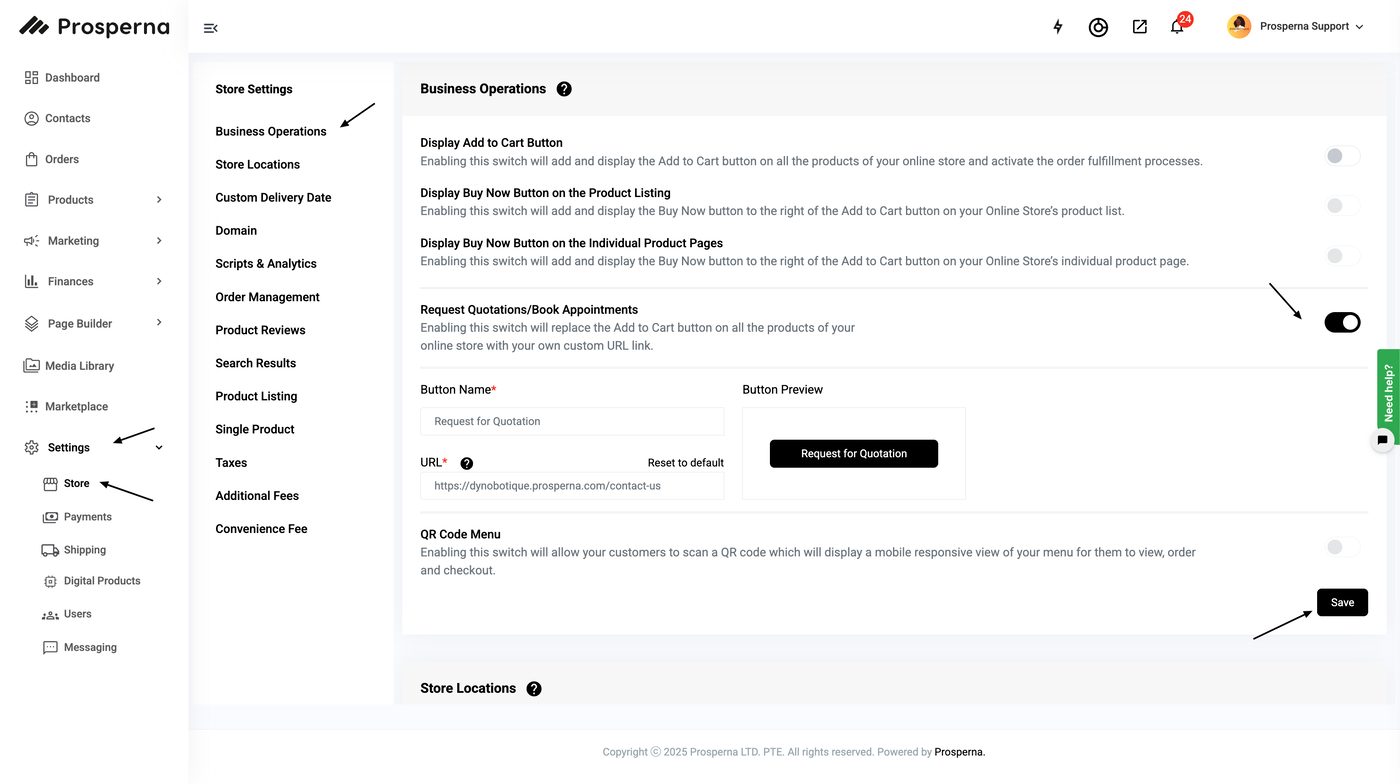
Results: You have now enabled the Request for Quotations/ Book Appointments Button
Need more help?
For more information and assistance, please send an email to support@prosperna.com.