

Feature Availability: ALL PLANS
Enable the Store Pick Up option, allowing customers to select in-store pickup during checkout. This feature provides a convenient alternative to shipping by letting customers retrieve their orders directly from your store.
Why is it important? It enhances customer convenience by offering a flexible, cost-saving alternative to shipping. It allows customers to quickly retrieve their orders, improves the shopping experience, and can boost in-store foot traffic.
Skill Level: Beginner | Advanced | Expert
How long does it take to do? 5 Minutes
Requirements:
Pickup Address
myPay activated account
Payment Method preference
Summary:
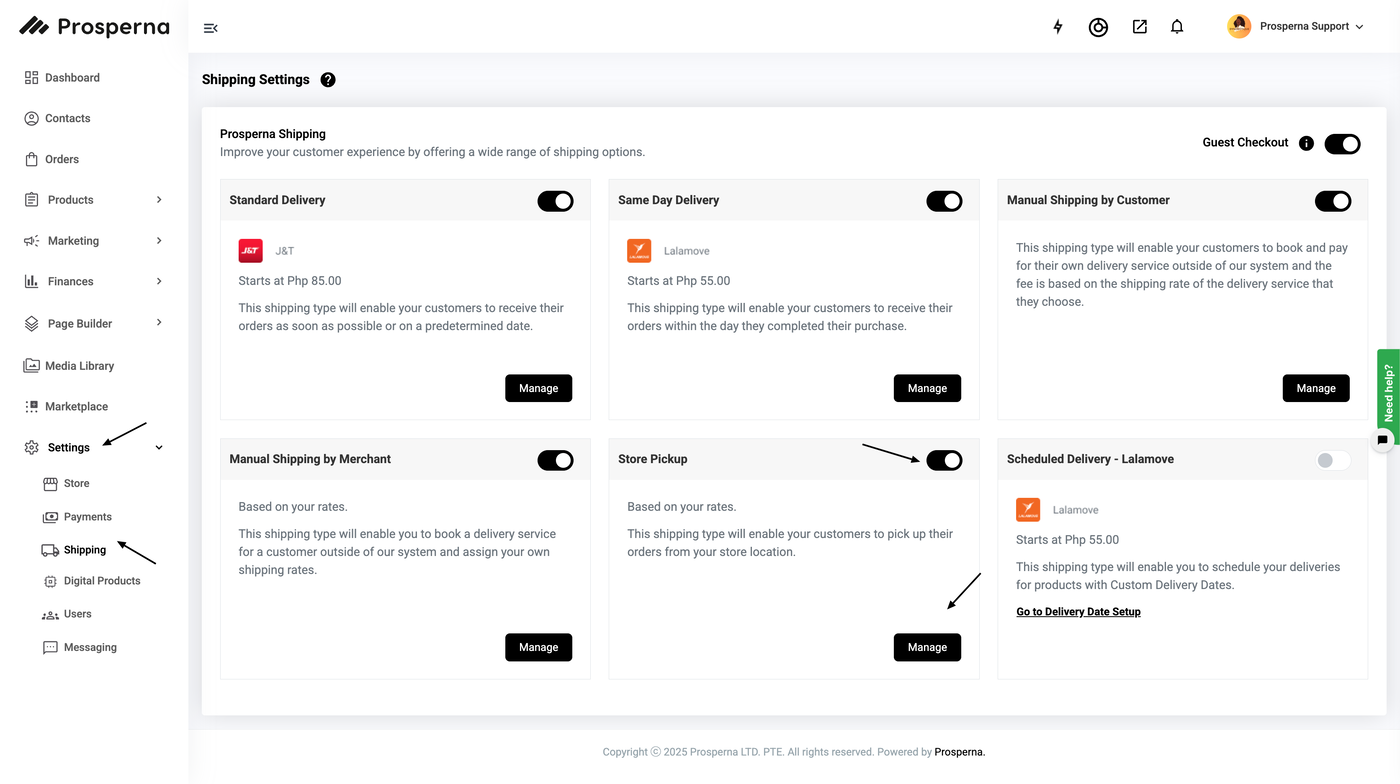
Go to Shipping
Toggle Store Pickup Button
Click Manage
Select Payment Option
Update your Shipping and Pickup Instructions
Add Pickup Address
Click Save
Steps to Activate Store Pickup
1. Go to Shipping.
2. Toggle Store Pickup Button.
3. Click Manage
4. Select Payment Option
5. Update your Shipping and Pickup Instructions
6. Add Pickup Address
7. Click Save

Result: Now your customers can use Store Pickup by Customer Merchant as a Shipping Method
Need more help?
For more information and assistance, please send an email to support@prosperna.com.