

What is BYO Shipping?
Bring Your Own (BYO) Shipping allows merchants to connect their own Lalamove account to their Prosperna store. Once connected, all Lalamove quotations, bookings, and tracking are processed using the merchant's own Lalamove account instead of Prosperna's shared account.
Why use BYO Shipping?
Using your own Lalamove account allows you to:
Pay delivery charges directly from your own Lalamove wallet
Use your negotiated courier rates
Configure customer-facing shipping fees
View deliveries from your own Lalamove dashboard
Maintain full control of your shipping operations
Skill Level: Beginner
Estimated Time :10–15 minutes
Requirements:
Philippine Prosperna store
Active Lalamove Partner account
Lalamove API Key (Public Key)
Lalamove Secret Key
Summary:
Open Settings → Shipping
Scroll to Connect your own Lalamove account
Enter your API credentials
Click Connect
Register the generated Webhook URL
Verify that the webhook becomes active
Connect Your Account
1. Go to Settings → Shipping.
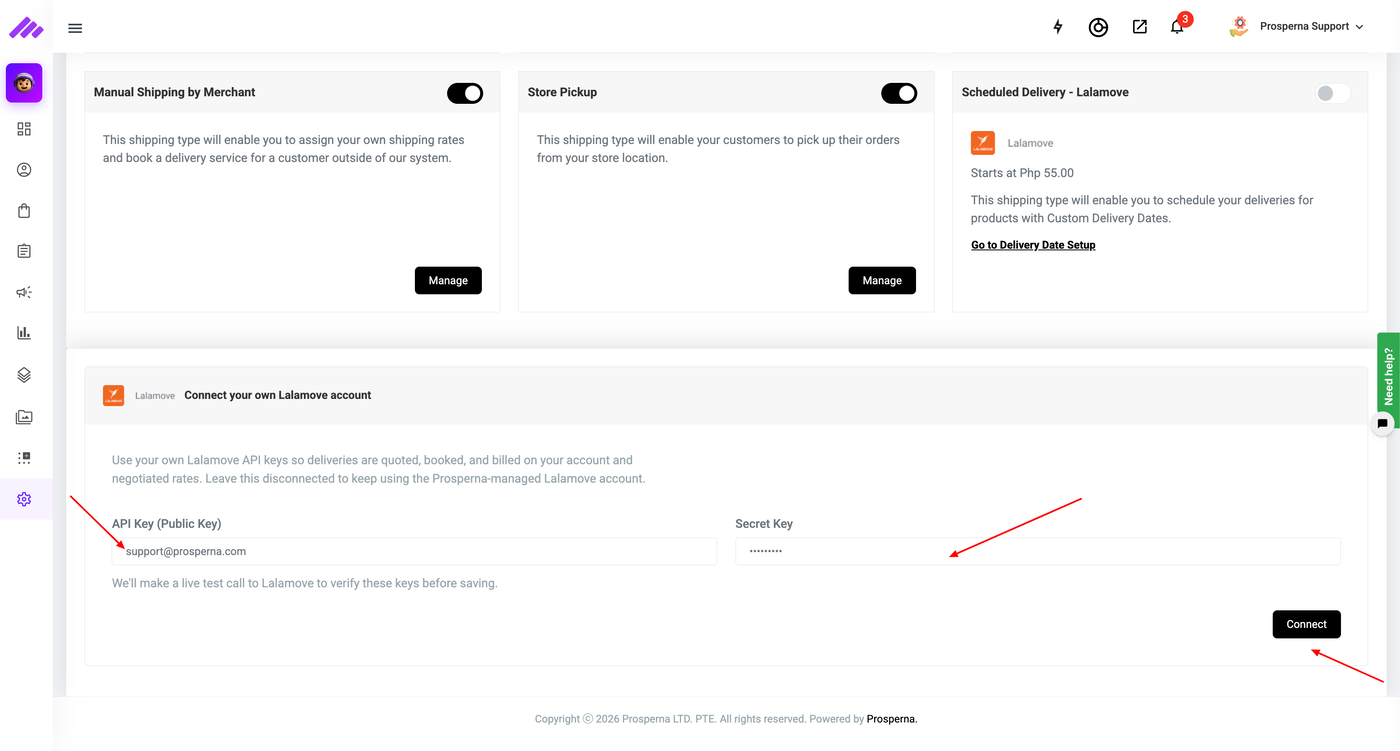
2. Scroll to Connect your own Lalamove account.
3. Enter:
API Key (Public Key)
Secret Key
4. Click Connect.
Prosperna validates your credentials before saving them.
5. Once successful, the page displays:
Connected
Public Key
Disconnect button
Expected Result
Your Prosperna store now uses your own Lalamove account for quotations, bookings, and tracking.
Need more help?
For more information and assistance, please send an email to support@prosperna.com.