

2-Step Verification is an extra layer of security to your Prosperna account by requiring a one-time verification code whenever you log in from an unrecognized device. This helps protect your account from unauthorized access.
Why Is It Important? 2-Step Verification helps protect your Prosperna account from unauthorized access by adding an extra security step during login. Even if someone gains access to your password, they will not be able to log in without the one-time verification code sent to your registered email. This feature is especially important for safeguarding sensitive business information and account settings.
Skill Level: Beginner | Advanced | Expert
How long does it take to do? 2 Minutes
Requirements:
An active Prosperna account
Access to the email address associated with your account
Summary:
Log in to your Prosperna account.
Click your profile icon at the upper right corner of the dashboard.
Select My Account from the dropdown menu.
Go to the 2 Step Verification tab.
Toggle 2 Step Verification via Email to enable the feature.
Once enabled, a 6 digit verification code will be sent to your registered email when logging in from an unrecognized device.
Steps to Enable 2-Step Verification
Log in to your Prosperna account.
Click your profile icon on the upper-right corner of the dashboard.
Select My Account from the dropdown menu.
Navigate to the 2-Step Verification tab.
Under 2-Step Verification via Email, toggle the switch to enable the feature.
Once enabled, Prosperna will send a 6-digit verification code to your registered email whenever you log in from an unrecognized device.
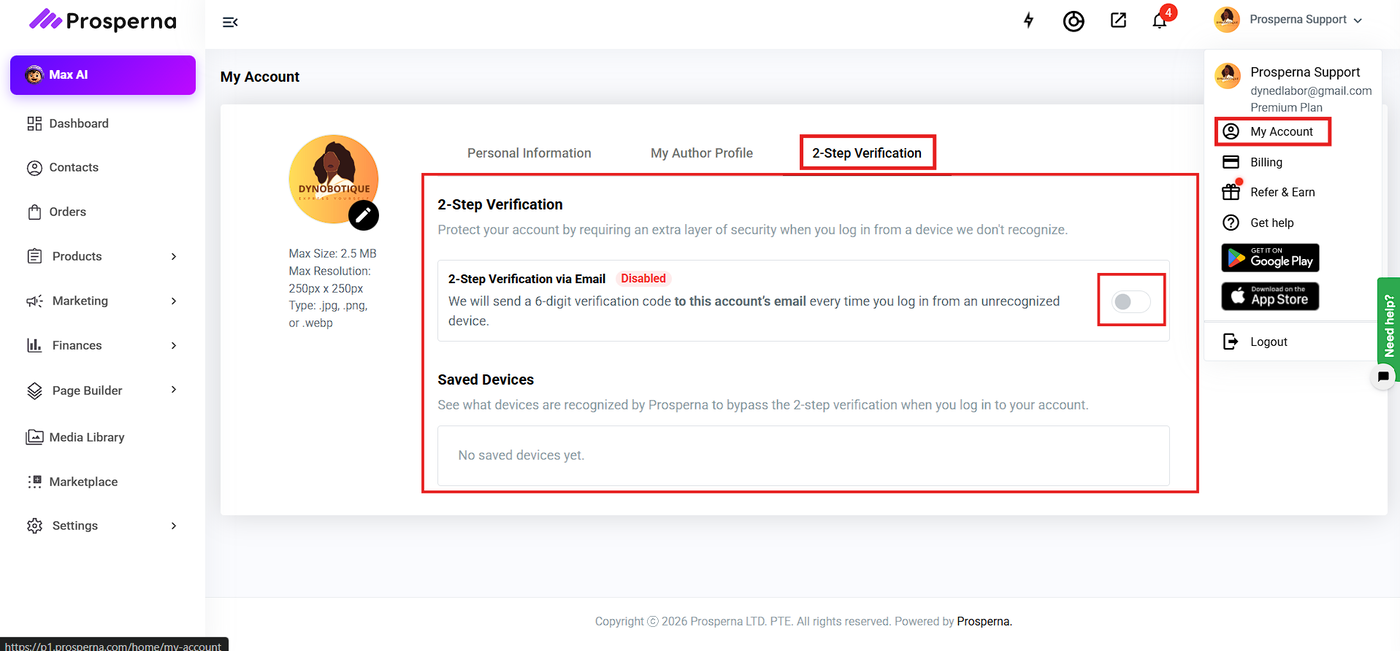
Saved Devices
Devices that successfully complete 2-step verification will be recognized and listed under Saved Devices.
Saved devices can bypass the verification step during future logins.
Notes
Make sure your email address is active and accessible to receive verification codes.
You can disable 2-step verification anytime by turning off the toggle.
If you do not receive the verification email, check your spam or junk folder.