

Feature Availability: ALL PLANS
It allows shoppers to instantly view and manage their selected items without leaving the current page. Customers can easily adjust quantities, remove items, or proceed to checkout — all within the same window.
Why Is It Important? This feature provides a faster and more convenient shopping experience. By keeping the cart always accessible, it minimizes checkout steps, helps reduce cart abandonment, and encourages customers to complete their purchases smoothly.
Skill Level: Beginner | Advanced | Expert
How long does it take to do? 2 Minutes
Summary:
- Select a Product and Click Add to Cart.
- Click the Cart Icon.
- Choose an Action.
How Floating Cart Works
Your customers can easily shop from your store by browsing your products and adding items to their cart. Here’s how the Floating Cart Checkout process works:
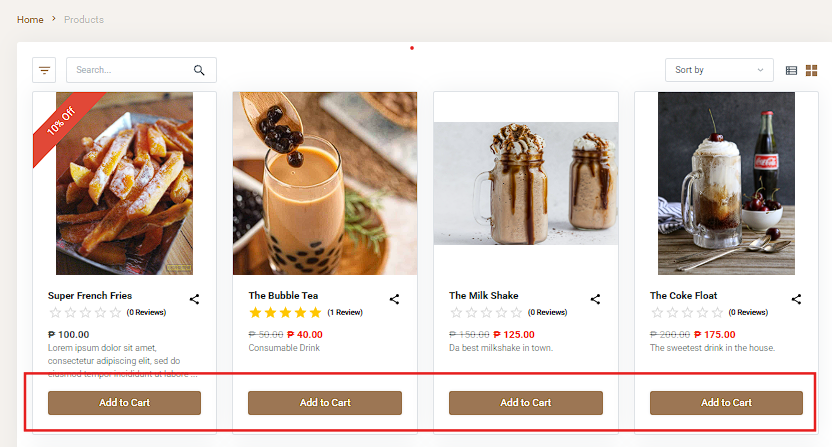
2. Click the Cart Icon on the navigation bar.

3. Choose an Action.
- You can either Continue Shopping or Proceed to Checkout to complete your purchase.
- Customers can also delete an item, or adjust the quantity by clicking the – or + buttons before proceeding to checkout.
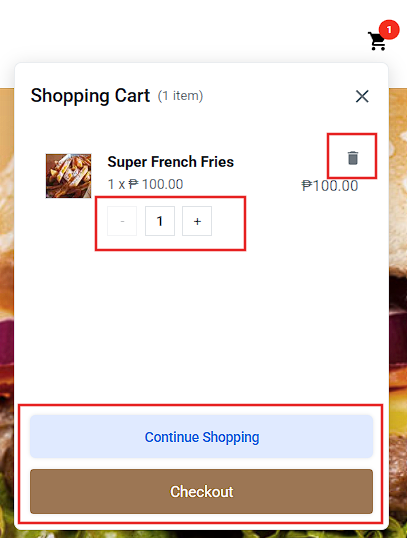
Result: You can now conveniently review, adjust, or remove items from their cart and proceed seamlessly to checkout.
Need more help?
For more information and assistance, please send an email to support@prosperna.com.